Storelift › Features › App Store analytics: install sources
Measurement
App Store analytics: install sources
Rank tells you where you stand. This screen tells you what that position brought in: how many people saw your app, how many opened its page and how many downloaded it, source by source.
Free plan: 1 app, 25 keywords in each of 2 storefronts, 30 days of history, no card, no end date. Pro is $20/mo.
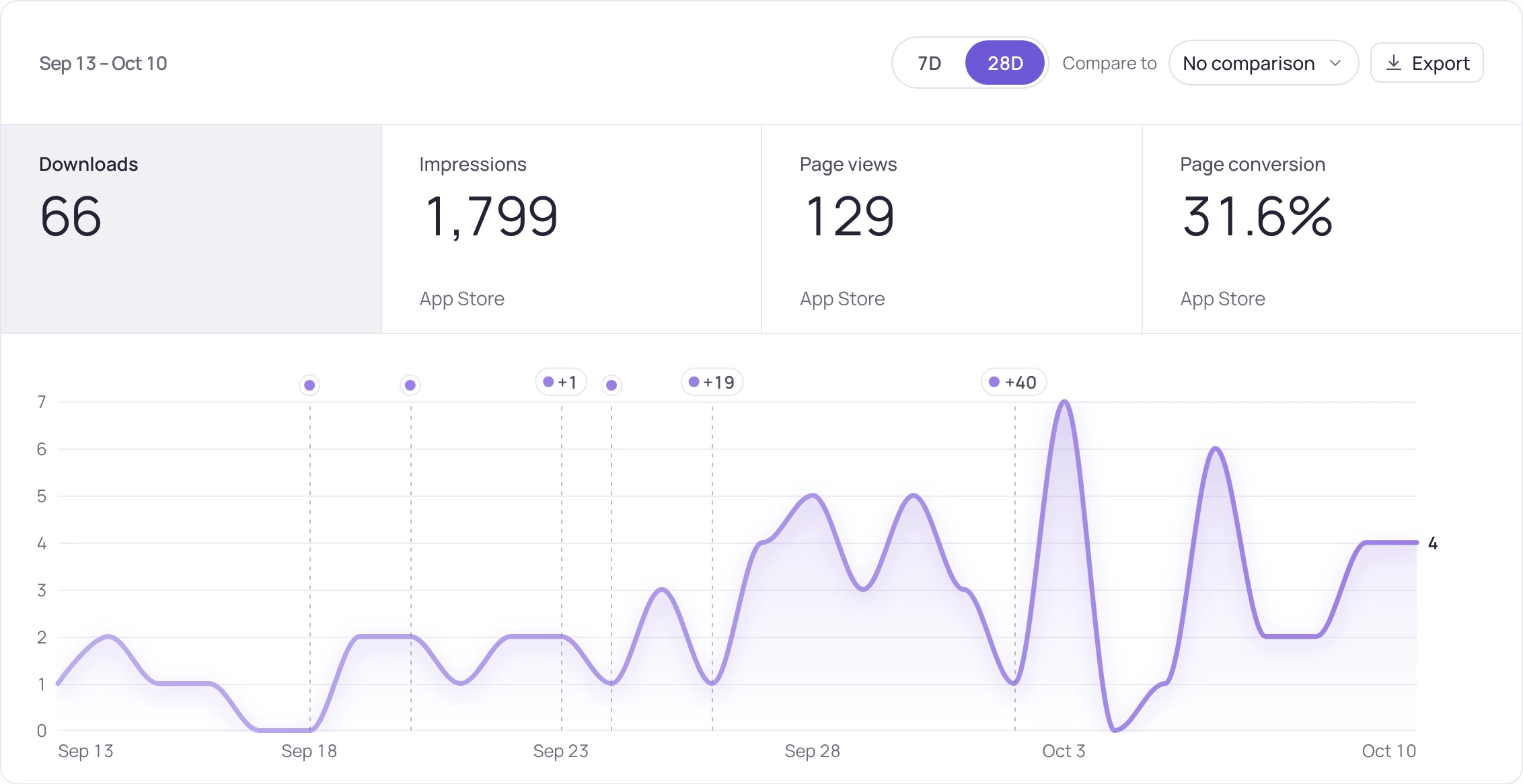
What the screen shows
What you do with it
Close the rank-to-download gap
Impressions next to positions tell you whether a better rank was worth anything.
Track your ranksFind out if it is even search
Search, browse and referrer downloads look the same in a total and mean very different things.
Fix the page, not the rank
Healthy impressions with a weak page-view rate is an icon and first-screenshot problem.
Work on your listingWhat the Downloads & sources screen shows
| Part | What it tells you |
|---|---|
| Impressions | How often your app was shown at all. A rank in a term nobody searches brings few impressions. |
| Page views | How many of those impressions became a visit to your product page. Icon, name and first screenshot do this work. |
| Downloads | How many visits became downloads, and the page conversion between the two. |
| Sources | App Store search, browse and referrers, with the share that came from search and daily downloads by source. |
| Download type and device | First installs, redownloads and updates, split by device. |
| Countries | Downloads by country over the last 28 days. |
| Google Play | Visitors, acquisitions and Play conversion, next to the App Store funnel. |
What each plan includes
| Free | Pro | Studio | |
|---|---|---|---|
| App Store Connect and Google Play Console connection | Yes | Yes | Yes |
| Impression → page view → download funnel | Yes | Yes | Yes |
| Sources, download type, device and country | Yes | Yes | Yes |
| Play search terms (Google Play) | Yes | Yes | Yes |
| Revenue history kept | 30 days | 9 months | up to 18 months |
Pro is $20/month or $200 a year ($16.67/month), Studio $60/month or $600 a year ($50/month). Download analytics are on every plan, Free included.
How it works
- Connect App Store Connect or Google Play Console from Settings. Opening these reports the first time needs an App Store Connect key with the Admin role; the screen tells you if that step is missing.
- A newly connected report starts filling within 24–48 hours. The last report day is printed on the screen, and the most recent couple of days can still change.
- Read the funnel next to your ranks, so “rank went up, downloads did not” becomes a question you can actually look at.
- For Google Play, the Play search terms screen shows the search terms that brought visitors to your page.
Before the first numbers
Two things to know when you connect.
The screen walks you through both:
- The Admin step. The first time these reports are opened, App Store Connect asks for a key with the Admin role. If that step is missing, the screen says so instead of showing empty charts.
- The wait. A report starts filling 24–48 hours after you connect, and the last report day stays on screen next to the numbers.
- In a team, viewers don't see the download and revenue screens; every other role does.
Updated:
Frequently asked
Do I have to connect App Store Connect to use Storelift?
No. Rank, competitors, demand, reviews and charts work from your store link alone. Connect App Store Connect when you want the download funnel and revenue screens, review replies and listing updates sent from Storelift.
Why did my report request return 403?
Because the first time these reports are opened, App Store Connect needs a key with the Admin role. The screen names that step for you.
How fresh is the funnel data?
A newly connected report starts filling in 24–48 hours. The last report day is printed next to the numbers, and the most recent couple of days can still change.
Why did my App Store rank go up but downloads did not?
Put impressions next to the rank. A rank in a term few people search brings few impressions; many impressions with few page views point at the icon, name and first screenshot; many page views with few downloads point at the rest of the page.
What do App Store analytics tools measure?
Two different things go by that name: figures for any app on the store, and your own store account numbers. This screen is the second: impressions, page views and downloads by source. For any other app's downloads and revenue, see App Intelligence.
Which traffic sources does it show?
App Store search, browse, app referrers and web referrers, kept apart, with the share that came from search. On Google Play you get visitors and acquisitions, and the Play search terms screen for the terms behind them.
See this for your own app
Paste your store link, add your keywords. Rank, the apps above you and demand are measured every day.
Start free →Free plan: 1 app, 25 keywords in each of 2 storefronts, 30 days of history, no card, no end date. Pro is $20/mo.