
Storelift › Features › Revenue, subscriptions and users, next to your ASO
Measurement
Revenue, subscriptions and users, next to your ASO
Connect the services you already use and see what your app earns, who uses it and whether the latest version holds up, on the same screens as your ranks and listing. When revenue moves, the growth tree shows which step moved it.
Free plan: 1 app, 25 keywords in each of 2 storefronts, 30 days of history, no card, no end date. Pro is $20/mo.
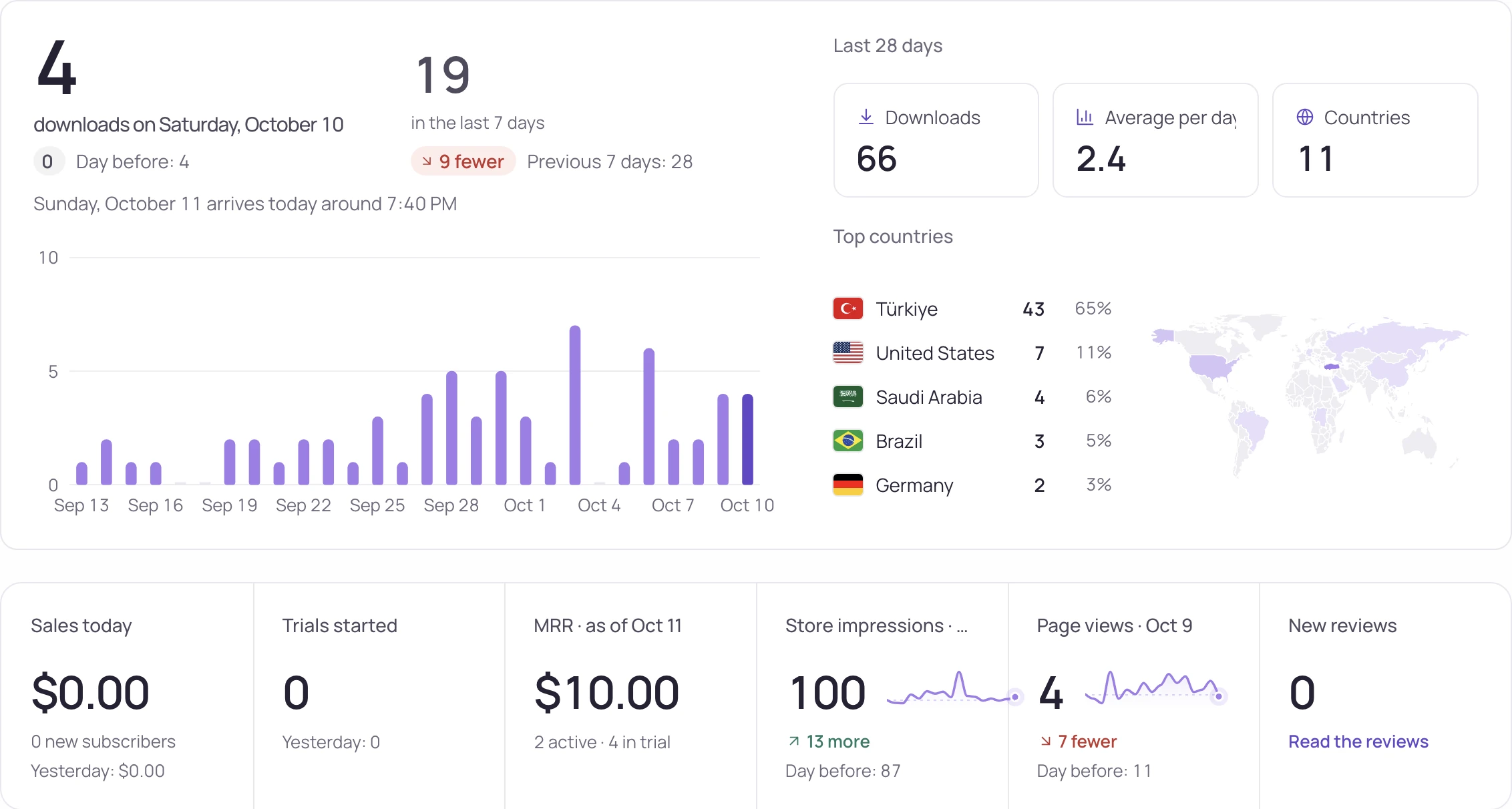
What the screen shows
What you do with it
See which step moved the money
Fewer page views, a weaker conversion or fewer payments: the growth tree points to the one that changed.
Price each country on purpose
Compare your price with local competitors country by country, then check what the change earned.
Catch a bad release early
App health compares the newest version with the one before, next to the reviews it brought.
See review analysisWhat each screen answers
| Screen | What it answers |
|---|---|
| Today | What happened today: who's in your app right now, today's sales and trials, recurring revenue, store impressions and page views, and ad earnings. |
| Growth tree | Which step moved the money: impressions, page views, downloads, payments and revenue, each with its change. Pick a step for its daily line, split by country or channel. |
| Revenue overview | Revenue, subscribers and downloads per day, for one app or your whole portfolio. |
| Subscriptions | How many trials turn into paid plans, and why people leave: by choice, or because a payment failed. |
| Pricing and offers | Whether a price change in a country earned you more, period against period, and what each offer code brought in. |
| Country prices | Country by country, whether you charge more or less than competitors who set local prices, with a suggested price you can download as a plan. |
| User activity | How many people use the app, whether they come back, installs and deletions on both stores, and which countries, devices and app versions they use. |
| Downloads | Downloads, store impressions and page conversion, and which channels the downloads came through. |
| App health | Crash rate, whether the newest version is worse than the one before, where it breaks, and the latest low-star reviews. iOS and Android are shown separately. |
What each plan includes
| Free | Pro | Studio | |
|---|---|---|---|
| Today, Growth tree, Revenue overview, Subscriptions | Yes | Yes | Yes |
| User activity, Downloads, Pricing and offers, App health | Yes | Yes | Yes |
| Revenue history | 30 days | 6 months | 1 year |
| Country prices | — | Yes | Yes |
| Connections | Yes | Yes | Yes |
Pro is $20/month or $200 a year ($16.67/month), Studio $60/month or $600 a year ($50/month). The revenue screens are on every plan, Free included.
How it works
- Connect what you use under Connections: App Store Connect, Google Play, RevenueCat, Adapty, Superwall, Google Analytics, PostHog, Amplitude, AdMob, AppLovin MAX. Each screen fills from the ones it needs.
- Open Today in the morning to see what changed since yesterday and who is in the app now.
- When revenue moves, open Growth tree, find the step that moved and follow it to the screen behind it.
- Changed a price or shipped a version? Pricing and offers and App health put the period before next to the period after.
What appears, and when
Each screen shows what you connected.
How the screens behave:
- A service that is connected but can't be read appears at the end of the page with the step that fixes it. Its figures are never drawn as zero.
- Connect RevenueCat or Adapty events to add trial conversion by country, refunds, billing issues and revenue by Apple Ads campaign.
- Revenue, users and app health stay hidden from teammates with view-only access.
- Revenue history covers 30 days on Free, 6 months on Pro and 1 year on Studio.
Updated:
Frequently asked
Which services can I connect?
App Store Connect, Google Play, RevenueCat, Adapty, Superwall, Google Analytics, PostHog, Amplitude, AdMob, AppLovin MAX. Connect them under Connections; each one fills the screens that need it.
Do I need RevenueCat to see revenue?
No. App Store Connect and Google Play bring downloads and sales. RevenueCat, Adapty or Superwall add trials, renewals and refunds as they happen.
How far back does revenue history go?
30 days on Free, 6 months on Pro and 1 year on Studio.
Can I see all my apps together?
Yes. Today and Revenue overview have a portfolio view with every app in one table.
Who on my team can see revenue?
Owners, admins and members. Teammates with view-only access don't see the revenue, users and app health screens.
Is it on the free plan?
Yes. Every revenue screen opens on Free with 30 days of history. Country prices starts on Pro.
See this for your own app
Paste your store link, add your keywords. Rank, the apps above you and demand are measured every day.
Start free →Free plan: 1 app, 25 keywords in each of 2 storefronts, 30 days of history, no card, no end date. Pro is $20/mo.