Your paid keywords, next to your organic ones.
A keyword's organic rank and its ad spend on one row, so you can see where you are paying for a place you already hold.
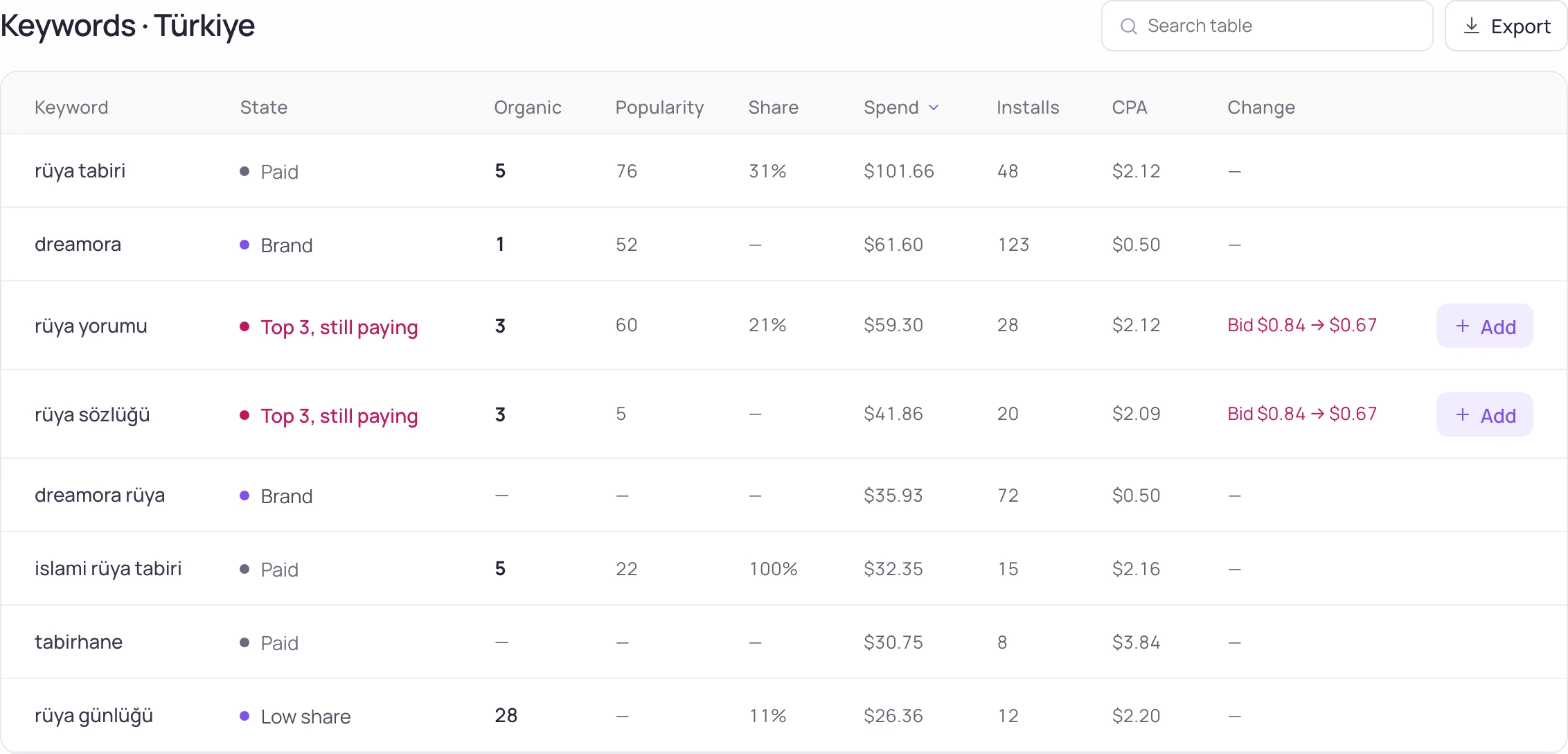
Paid and organic on one row, in 175 storefronts.
See the spend where the rank is
Three screens, one question: is this keyword worth paying for?
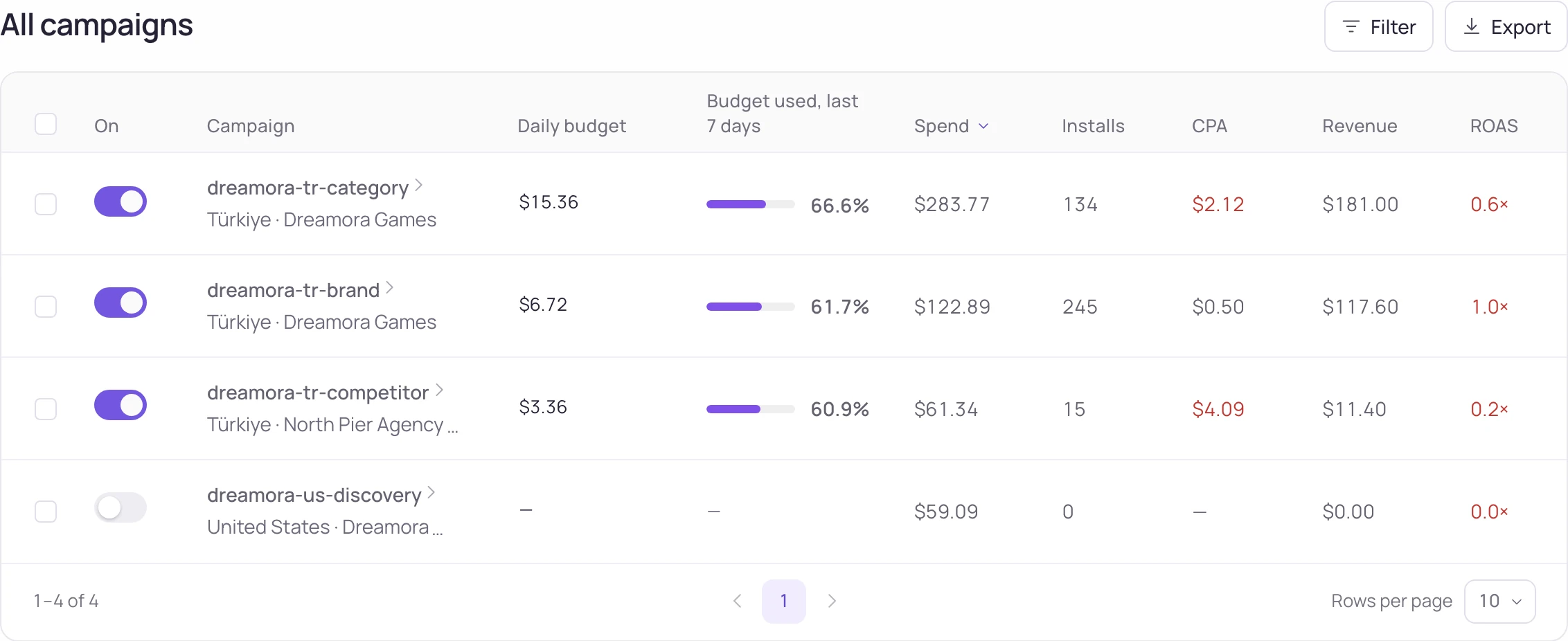
Every campaign, with what it brought
Spend, installs and cost per install for each campaign, next to the downloads and revenue you already connected.
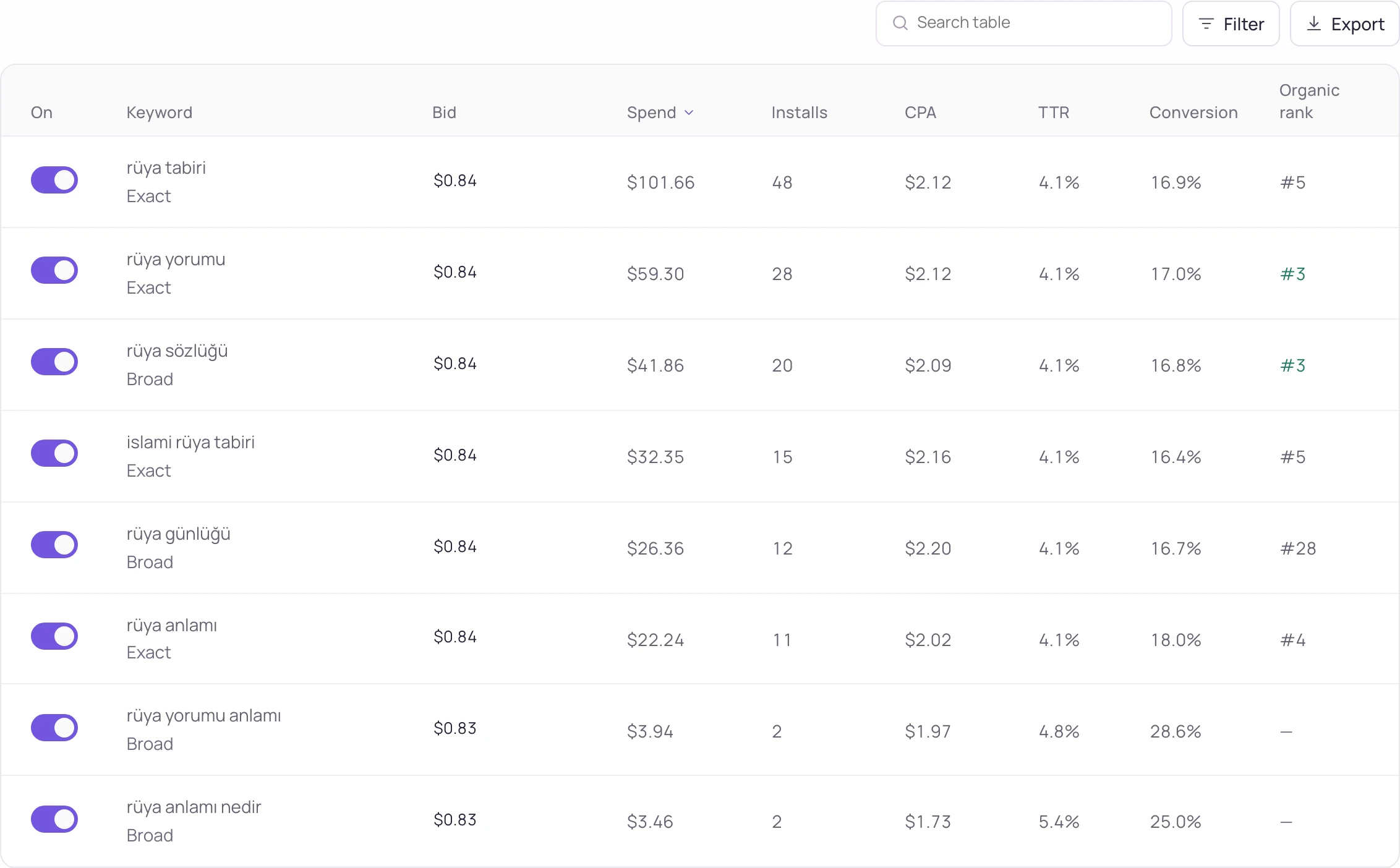
One campaign, keyword by keyword
Open a campaign and read each keyword's spend, installs, cost per install and the revenue it brought.
Pause, resume and set budgets from here
Change a campaign on the screen that showed you why, and follow each change until Apple confirms it.
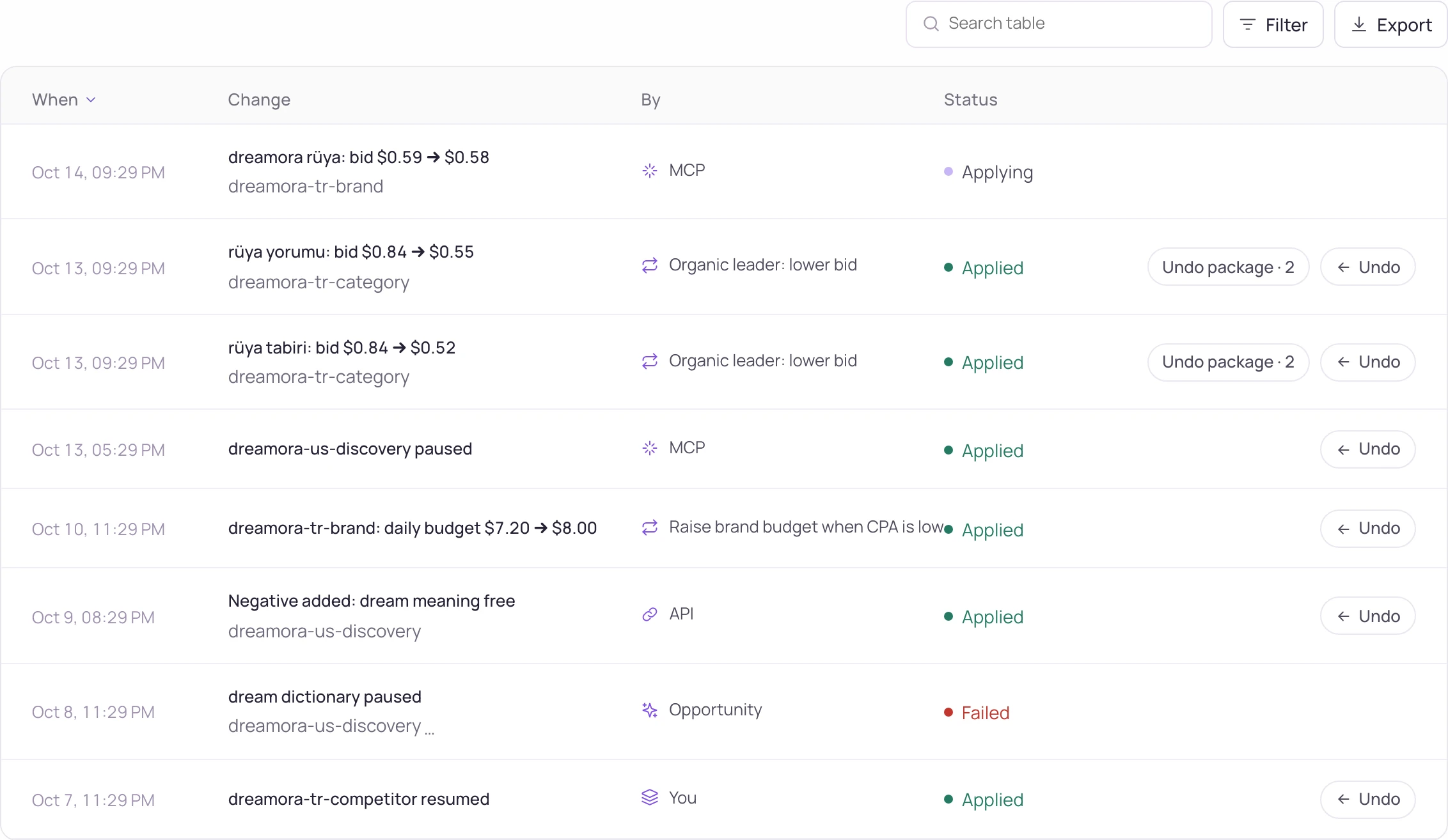
Rules that act, and can be undone
A rule watches one campaign over a window of up to 28 days and does one thing when it trips. Every automated change is written to a log with an undo.
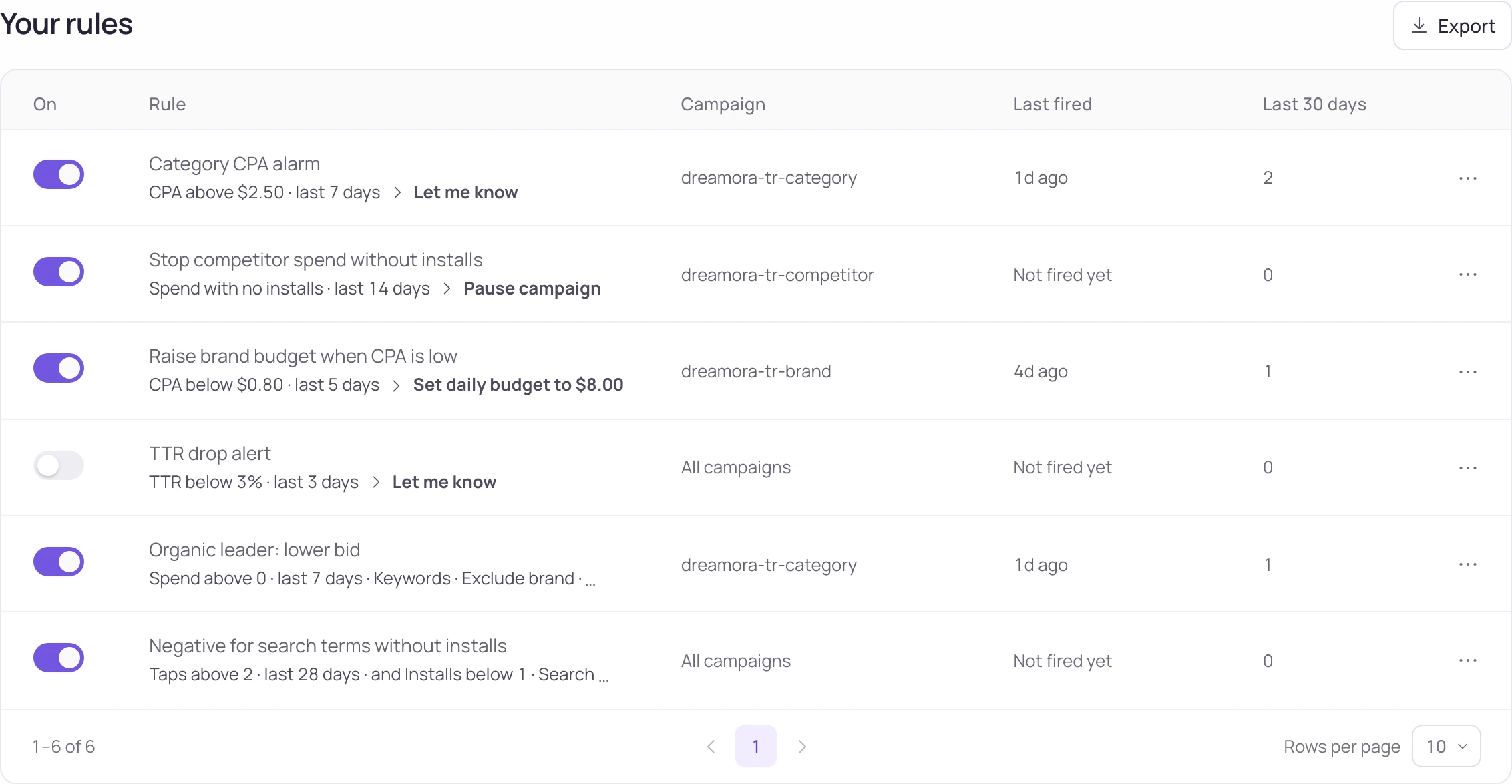
Watch
- Pick a metric
CPA, cost per tap, spend, installs, taps, impressions, CTR or conversion rate.
- Pick a window
Up to 28 days, today excluded — Apple has not closed today's numbers yet.
Act
- Pick an action
Notify, pause, resume, or set the daily budget (up to $10,000).
- A cooldown, so it fires once
A rule that tripped waits 24 hours before firing again instead of shouting every hour.
Stay in control
- Undo on every change
A rule that changed a budget or paused a campaign writes what it was before, and one click puts it back.
- A separate write key
Reading your campaigns and changing them are two different permissions. The management screen opens once the write key is connected.
What it costs
Free up to $25,000 of ad spend a month. Above that, 3.5% of the part above the line, billed apart from your plan.
Sample data, not measured.
on the $25,000 above the line
- Up to $25,000 a month
- Included in your plan at no fee
- At $20,000
- We tell you a card will be needed soon; everything keeps running as before.
- Above $25,000
- 3.5% of the part above the line. Spend $31,400 and the fee is on $6,400 — $224, not $1,099.
- Invoiced
- Monthly, after the month closes, from the spend we measured. You see the figure before it is charged.
- Above the line with no card
- Management pauses — rules, campaign pauses and budgets. Reading stays open: reports, charts and alerts keep working.
- Plan
- Any, including Free. The ads fee is billed on its own.
The same ceiling, a lower fee, and no plan to buy first
All three are free up to a monthly ad-spend ceiling. Above it AppTweak takes a share of spend and the other two send you to sales. Storelift is the one you can use without buying a plan first.
| Storelift | AppTweak | SplitMetrics | MobileAction | |
|---|---|---|---|---|
| Free up to | $25,000 / mo | €25,000 / mo | $25,000 / mo | $10,000 / mo |
| Fee above it | 3.5% | 4% | Contact sales | Contact sales |
| Charged on | The part above the line | The part above the line | Contract | Contract |
| Needs a plan first | No | Yes | Yes | Yes |
| Organic rank next to ad data | 175 storefronts | Yes | 9 storefronts | Yes |
Ceilings and rates read from the vendors' own pages on 2026-10-11
Ads works because the organic side is already there
The organic rank on that row comes from the same keyword, in the same storefront, on the same day.
FAQ
Questions
Do you take over my campaigns?
You keep your Apple Ads account and your campaigns. Storelift reads them, shows them next to organic rank, and changes what you apply or what a rule you wrote tells it to.
When does the fee start?
When your Apple Ads spend passes $25,000 in a calendar month. We ask for a card at $20,000 so the threshold does not arrive as a surprise.
Is the fee on all my spend?
Only on the part above $25,000. Everything below the line stays free, every month.
What if I do not add a card?
Management pauses: rules wait, and campaign state and budgets stay as they are until a card is added. Reports, charts and alerts keep working, and your campaigns keep running in Apple's own console.
Can an automated change be undone?
Yes. Every change a rule makes is written with what it was before, and one click restores it.
Which plan do I need?
Any, including Free: pause, resume and daily budgets work on every plan with the write key. Rules come with Pro (5) and Studio (25), and ad changes through MCP and the API with Studio. The ads fee is billed on its own.
Does it work outside the US?
Yes — every Apple Ads storefront your account runs in, next to the organic rank we measure in that same country.
Can I turn it off?
Disconnect Apple Ads whenever you like. It runs month to month and the fee stops with the month.
Connect Apple Ads and see the two numbers together.
Free up to $25,000 a month. Above that, 3.5% of the part above the line.