
Storelift › Features › ASO metadata audit
Metadata
ASO metadata audit
See which of your keywords each field already covers, fill the hundred characters with words people search, and get a draft that passes Apple's rules before it goes into App Store Connect.
Free plan: 1 app, 25 keywords in each of 2 storefronts, 30 days of history, no card, no end date. Pro is $20/mo.
What the screen shows
What you do with it
Find the empty column
Every tracked keyword your listing leaves out, field by field and storefront by storefront.
Check a keyword fieldFill the hundred characters
Repeats come out, searched keywords go in, and the screen shows how many more searches the new field covers.
Count charactersShip text that passes review
Apple's rejection rules are checked in the draft, so a product name or a price line doesn't cost you a review round.
Next to your text
Screenshots sit on the same store page: Screenshot analysis shows what each storefront displays and how it compares with competitors. To write the listing in a language you don't cover yet, use localization.
What you see
| Screen | What it tells you |
|---|---|
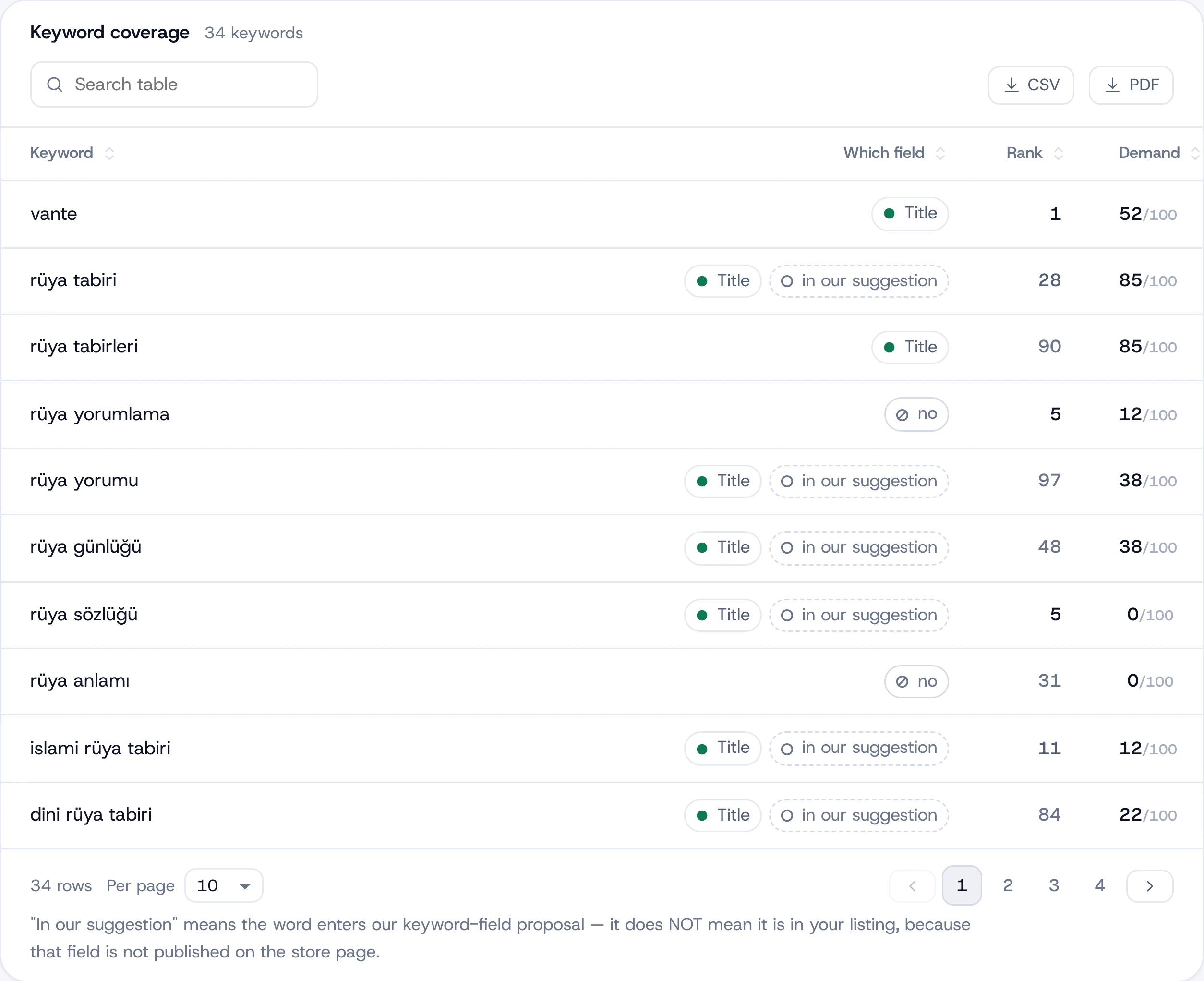
| Text & keywords | Which of your tracked keywords the name, subtitle, keyword field and description cover, and which appear nowhere. |
| Repeat waste | Words written twice across fields. A repeat only uses characters. |
| Competitors rank, you don't | Keywords where competing apps rank and yours doesn't, so you know which gaps cost the most. |
| Suggested keyword field | A keyword field that fits in 100 characters, with how many searched keywords it covers next to your current field. |
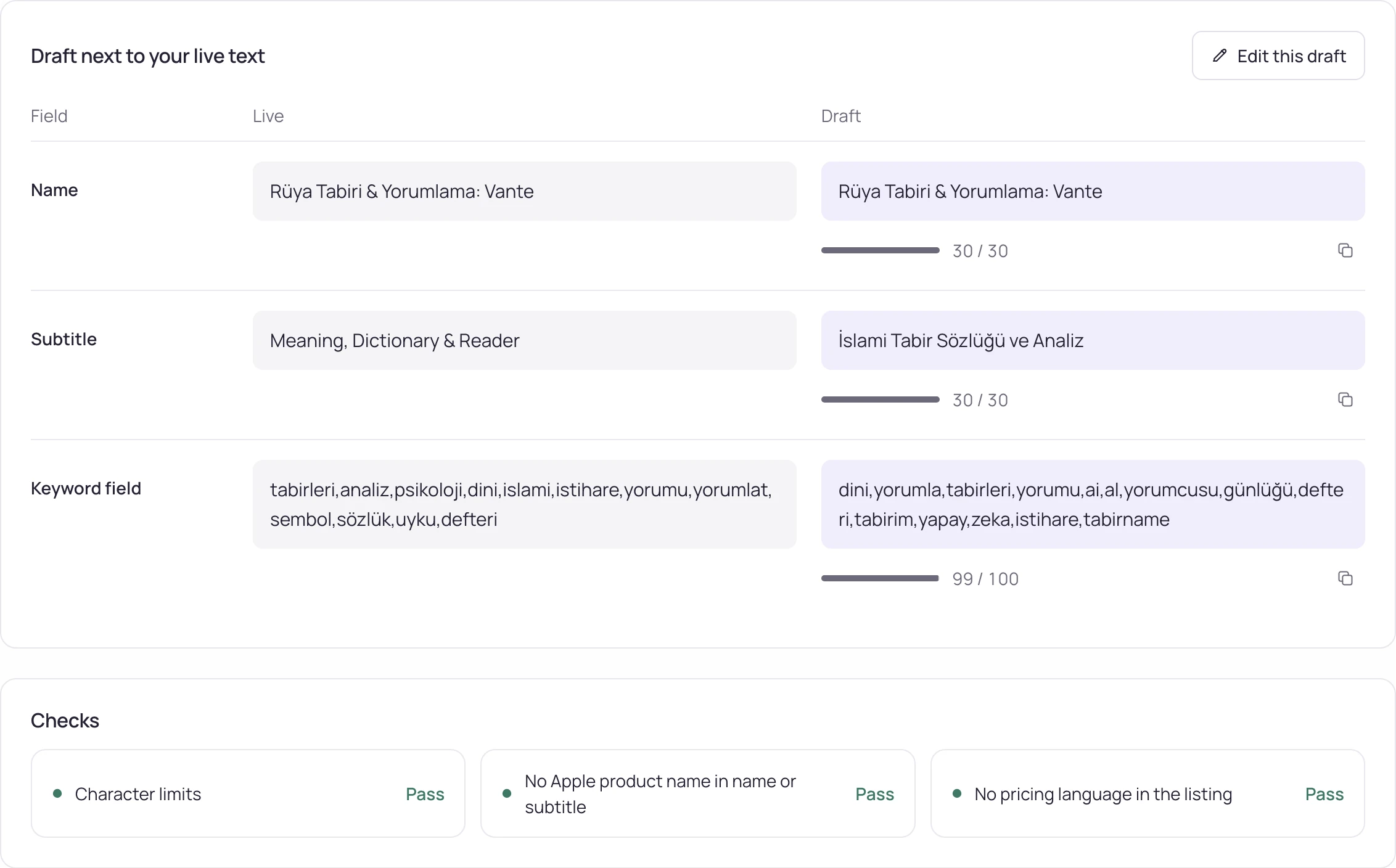
| Draft | Name, subtitle, promotional text, description and keyword field written from your keywords, next to your live text. Draft is on every plan. |
| Checks | Character limits, Apple product names in the name or subtitle (5.2.5) and price language (3.1.2), flagged before you submit. |
What each plan includes
| Free | Pro | Studio | |
|---|---|---|---|
| Text & keywords | Yes | Yes | Yes |
| Suggested keyword field | Yes | Yes | Yes |
| Tracked keywords (keyword × storefront) | 50 | 2,500 | 10,000 |
| Storefronts | 2 | All 175 | All 175 |
| Draft | 1 a month | Yes | Yes |
| Send to App Store Connect | — | — | Yes |
Pro is $20/month or $200 a year ($16.67/month), Studio $60/month or $600 a year ($50/month). Drafts share the monthly AI text quota with suggestions: 100 on Pro, 300 on Studio.
How it works
- Pick a storefront. Your live listing for that storefront opens field by field, with the characters each field still has.
- Read the coverage. Each tracked keyword is marked as in the name, in the subtitle, in the keyword field, in the description or nowhere.
- Use the suggested keyword field, or edit the draft yourself. The table updates as you type, compared with your live text. If you connected App Store Connect, your own keyword field is in the table too, including the version on its way.
- Open Draft to get a full listing, then copy it, or on Studio send it to App Store Connect.
How the text ships
You choose how the text reaches the store.
A draft ends up in one of these ways:
- Copy it, field by field or all at once, into App Store Connect or Play Console.
- On Studio, send it to an editable App Store version from the screen, through MCP or the API. You see the before and after first, then confirm.
- Nothing is submitted for review. The text waits in the version until you submit it.
Updated:
Frequently asked
Can I see a competitor's keyword field?
You see every word in a competitor's name, subtitle and description, and the keywords where they rank and you don't. The keyword field itself is visible only to its developer in App Store Connect.
Do the name and subtitle share a character budget?
No. The name and the subtitle have 30 characters each and the keyword field 100; each keeps its own limit, so the screen counts them separately.
Can Storelift send my text to App Store Connect?
Yes, on Studio. It sends the text to an editable App Store version after a before-and-after preview you confirm. Nothing is submitted for review; you submit when you choose. On every plan you can copy it into App Store Connect or Play Console.
Which keywords is my App Store listing missing?
"Text & keywords" answers that per storefront: the "not in your text" rows list the tracked keywords your listing leaves out, and "Competitors rank, you don't" shows where that gap already costs you.
Is there a free ASO checker?
Yes. Text & keywords is on the free plan, for 25 keywords in each of 2 storefronts, with 1 draft a month. The free character counter checks field lengths in the browser.
What does the draft check?
Character limits, Apple product names in the name or subtitle (guideline 5.2.5) and price or discount language (3.1.2). On Google Play, the draft is checked against Google's store listing rules.
See this for your own app
Paste your store link, add your keywords. Rank, the apps above you and demand are measured every day.
Start free →Free plan: 1 app, 25 keywords in each of 2 storefronts, 30 days of history, no card, no end date. Pro is $20/mo.