Ask your assistant about your app. It answers from your data.
Storelift runs an MCP server. Connect it once and Claude, ChatGPT, Cursor or any MCP client reads your ranks, rivals, reviews, revenue and the market through 85 tools — and every change it proposes waits for your approval.
Which of my US keywords lost ground this week, and who is above me on them now?
get_keywords1
get_history1
get_rivals1
2 keywords dropped in the US this week. Calm Rain is first on both.
storelift.net/mcp−3 credits
{
  "jsonrpc": "2.0",
  "id": 2,
  "method": "tools/call",
  "params": {
    "name": "get_rivals",
    "arguments": {
      "appId": "sbx-lumen",
      "country": "us"
    }
  }
}One address for every client
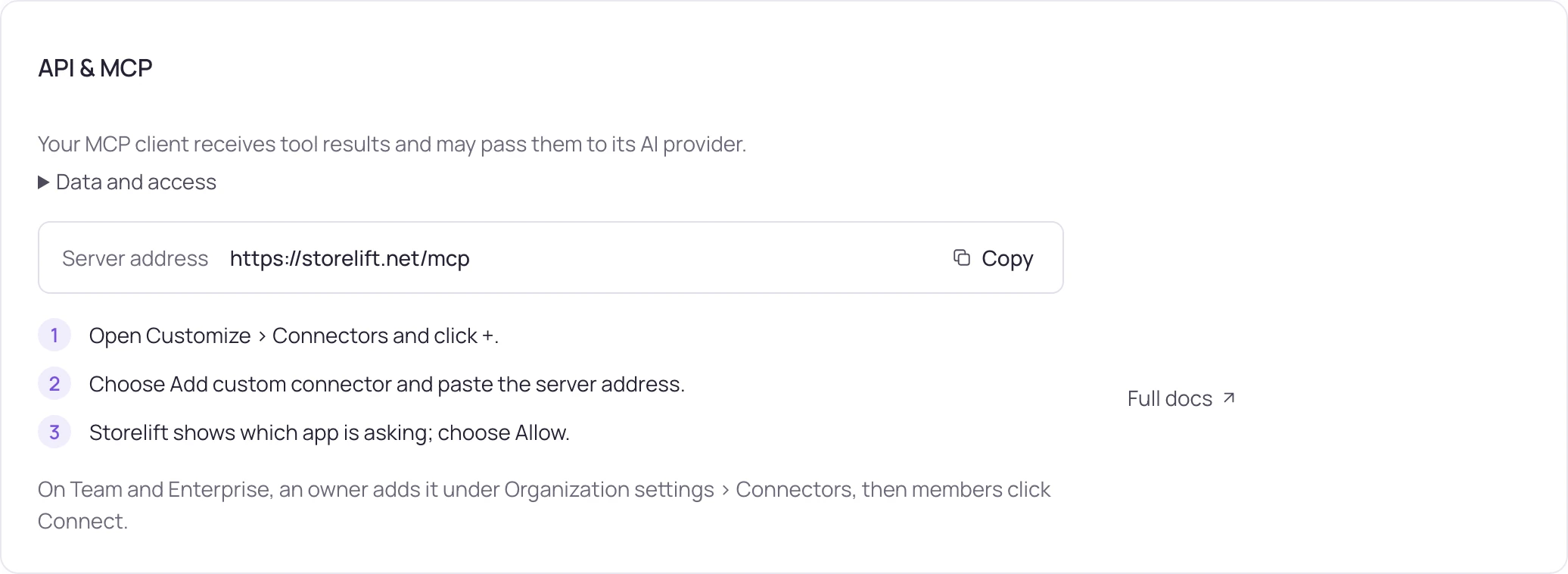
The hosted server speaks Streamable HTTP and signs you in with OAuth. Pick your client:
Server addresshttps://storelift.net/mcp
- Open Customize › Connectors and click +.
- Choose Add custom connector and paste the server address.
- Storelift shows which app is asking; choose Allow.
On Team and Enterprise, an owner adds it under Organization settings › Connectors, then members click Connect.
What the 85 tools read and change
Each tool carries its scope and its credit cost, so the assistant and you see the price of a call before it runs.
| Tool | What it does | Scope | Plan | Credits |
|---|---|---|---|---|
list_apps | The apps in your account, with their countries and keyword counts. Every other call starts here. | apps:read | Free | 1 |
get_keywords | Current rank for each tracked keyword in one storefront, in the same three states the product uses. | apps:read | Free | 1 |
get_rivals | The apps standing above you on a term, with their rating counts and last ship date. | apps:read | Free | 1 |
get_ai_visibility | App mentions in a dated sample of AI engine answers. Studio or Enterprise and ai:read are required; it does not reproduce what every user sees. | ai:read | Studio | 1 |
run_ai_visibility_check | Starts an AI visibility sample with the engines available for the run, using one plan or purchased AI visibility allowance. Requires Studio or Enterprise and ai:read; Pro's panel allowance does not unlock this MCP tool. Read the result with get_ai_visibility. | ai:read | Studio | 1 |
get_history | One keyword's rank series. A null rank marks a measured day where the app was absent from the results. | apps:read | Free | 1 |
get_store_page | Your own app's listing signals in one storefront as the store serves them: version, screenshots, in-app events, editorial placements, similar-apps shelves, supported languages, star breakdown, promotional text, featured in-app purchases and the dated changes we detected. | apps:read | Free | 1 |
get_reviews | Store reviews for an app, so an assistant can read what users actually wrote. | reviews:read | Free | 1 |
get_charts | Where an app sits in the store's category charts. | apps:read | Free | 1 |
search_reviews | Searches one app's reviews by text, star rating, version and date range — up to 1,000 rows from the full review archive. | reviews:read | Free | 1 |
get_review_stats | Rating distribution and average, a day-by-day curve and a per-version breakdown, so a drop lines up with the release behind it. | reviews:read | Free | 1 |
summarize_reviews | Review AI: a summary of the recent reviews and their themes, each backed by quoted reviews; the day's summary is reused at no allowance. | reviews:read | Free | 1 |
draft_review_reply | A reply draft for one review, written from the stored review text plus your note; posting stays with reply_review. | reviews:read | Free | 1 |
get_listing_timeline | Dated listing changes — version, screenshots, events, featuring and keyword-field edits — each with the rank movement around it. | apps:read | Free | 1 |
get_today | One app's day in one answer — purchases and trials, new reviews, rank and category moves, new entrants, events and yesterday's store figures. | apps:read | Free | 1 |
get_keyword_competition | How many apps compete on each keyword, counted from the rank index — for tracked terms or for candidates you name. | apps:read | Free | 1 |
get_rival_detail | A rival's rating history and the keywords it ranks for, with its rank on each. | apps:read | Free | 1 |
get_rival_ad_networks | The ad networks a rival works with, each marked DIRECT or RESELLER. | apps:read | Free | 1 |
get_rival_market | A rival's installs and in-app price range on Google Play; price, rating count and release date on the App Store. | apps:read | Free | 1 |
get_storefront_audit | Your iOS listing across every storefront: where it is sold and which storefronts serve fallback text or screenshots. | apps:read | Free | 1 |
check_rank | The live rank of one of your apps for any search term in one storefront, tracked or not. | apps:read | Free | 10 |
get_keyword_metrics | Demand and difficulty inputs for one term: related searches, the top results' rating counts and title matches. | apps:read | Free | 10 |
suggest_keywords | New keyword ideas in the storefront's search language, each with who searches it and why the app answers — tracked, buried and brand terms left out. | apps:read | Free | 1 |
validate_listing | Checks a draft listing before App Store Connect: character limits per field, keyword-field room lost to spaces, repeats, name/subtitle words, brand and filler words, Apple product names and price words, the locale's language and script, and the tracked keywords the draft leaves out. | apps:read | Free | 1 |
draft_listing | Title, subtitle, promotional text and description drafted from the measured keywords, with character counts and review checks. | apps:read | Free | 1 |
localize_listing | Writes the full listing for a new locale — name, subtitle, keyword field and description — from the source listing, every keyword measured in that storefront first, and with shots the screenshot captions; runs in the background, read it with poll. | apps:read | Free | 1 |
get_screenshot_text | The caption text on your first four screenshots — the text that works on conversion. | apps:read | Free | 1 |
get_chart_movers | Who moved today in the app's own category: risers, fallers, new entrants and drop-outs with names, plus where the app and its chosen rivals stood on both days. | apps:read | Free | 1 |
get_featuring | Where Apple shows the app today: editorial cards (its own story or a collection), live and scheduled In-App Events, the similar-apps shelf — per country, with the dated history. | apps:read | Free | 1 |
list_alerts | The workspace's alert feed, newest first, with the unread count — the same feed as the dashboard bell. | apps:read | Free | 1 |
get_portfolio_overview | Today across every app in the workspace, one row per app — live users, users, new users, ad revenue, subscription revenue and trials — with totals and the subscription event feed; the same numbers as the Today screen. | apps:read | Free | 2 |
search | Search your own apps, tracked keywords and rivals; returns ids for fetch — the shape ChatGPT's deep research expects. | apps:read | Free | 1 |
fetch | The full record behind a search id: an app card, one keyword with its history, or one rival. | apps:read | Free | 1 |
get_app | One app with its ids, countries, keywords per country and the latest snapshot. | apps:read | Free | 1 |
get_weekly_plan | This week's ASO plan: the next tasks, highest priority first, each with the measurement behind it, where the keyword sits in the listing now and what clears the task. | apps:read | Free | 1 |
One question, start to finish
Ask "Who ranks above my app in the US?" and the assistant makes 2 calls: list_apps → get_rivals. Below are the second call and the first row of its result, as a test key returns them from the fixed sample data.
{"jsonrpc":"2.0","id":2,"method":"tools/call","params":{"name":"get_rivals","arguments":{"appId":"sbx-lumen","country":"us"}}}{
"country": "us",
"platform": "ios",
"rivals": [
{
"id": "1000000101",
"name": "Calm Rain",
"ratings": 57046,
"terms": [
{
"term": "sleep sounds",
"theirRank": 1,
"ourRank": null
}
]
}
]
}ourRank: null means the app does not appear in the results for that keyword. With all its keywords, that first row says Calm Rain (57,046 ratings) is above the app on 8 tracked keywords, and on 2 of them the app is absent.
An app id the workspace does not have comes back as a tool error the assistant can read: ERROR: No such app in this workspace.
Scope apps:read · 2 credits with a live connection, 0 with a test key · tools in storelift-mcp 1.1.1 and later, test keys from server version 1.5.0
Every change is a preview first
20 tools can change something — track a keyword, reply to a review, pause a campaign. Each one runs in two steps.
- Preview
The tool returns what would change, field by field, and a single-use confirmation token. Your data stays as it is, and a preview costs 0 credits.
- Your approval
The assistant applies the change with confirm_action after you say yes, and the confirm checks that the data still matches the preview. Applying costs 2 credits.
- Your client's own check
Tools that delete, pause or overwrite are marked destructive, so your client asks before it even calls them.
- Guardrails
A budget step moves a campaign by at most 50%, listing text goes to an editable version and review submission stays yours.
What a call costs
MCP spends from the same monthly balance as the API. The balance and each call's cost are readable from the assistant itself.
- Free
- 1,000 credits a month · OAuth or one MCP key
- Pro
- 12,000 credits a month · OAuth or live key
- Studio
- 50,000 credits a month · OAuth or live key
- Enterprise
- 150,000 credits a month
- Your apps, reviews, revenue
- 1–10 credits a call
- Market (Hive Explorer or a credit pack)
- 10–500 credits a call
- Account, usage, job status
- 0 credits
- Previews · applying a change
- 0 · 2 credits
Questions to start with
The server publishes these as MCP prompts, so a client that lists prompts offers them ready to run. The tool names show what the assistant calls.
- Which of my US keywords lost ground this week, and who is above me on them now?
get_keywords · get_history · get_rivals
- Which apps rank above me on my main keyword, and what do their names have in common?
get_rivals · get_store_page
- Summarise my recent reviews that mention a crash or a bug.
get_reviews
- Where does my app sit in its category chart in Turkey?
get_charts
- Do assistants name my app when asked about my category?
get_ai_visibility · run_ai_visibility_check
- Walk me through this week's ASO review: what should I work on first, which keywords moved, and who is ahead of me on them?
get_weekly_plan · get_keywords · get_rivals
FAQ
Questions
Which plan do I need?
Every plan, Free included. Free carries 1,000 credits a month, over OAuth or with its one API key, which works for MCP only; Pro, Studio and Enterprise add more credits, Storelift API keys and the revenue and ads tools. The market tools run on Hive Explorer or a credit pack.
Can the assistant change things on its own?
It can prepare a change and show you the preview. Writing happens only when you approve and the assistant sends the confirmation token.
Where do I see which assistants are connected?
Settings › API › Connected apps lists every client you allowed. Removing one cuts its access on its next request.
Does an OAuth connection read everything in my account?
It reads exactly the scopes your plan carries. A live API key can be narrowed further to chosen scopes and apps.
Is the data the same as in the dashboard?
Yes. Every tool reads the same measurement, with the same three states: ranked, measured but absent, and not measured.
Your ASO data, one question away.
Sign up on the free plan, add the server address to your assistant and ask your first question.