What the screen shows
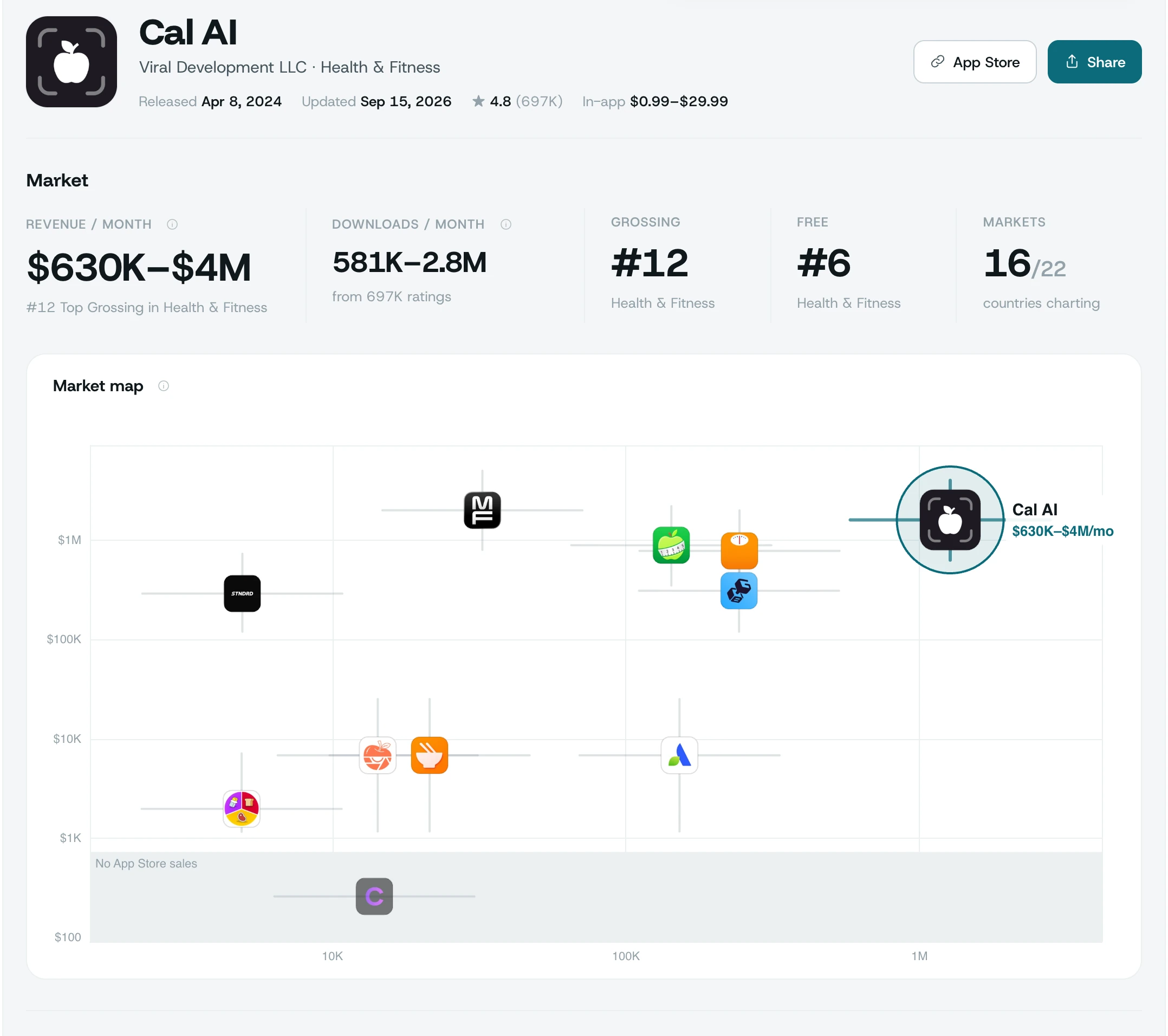
Every figure on this page is read from a code path, not written by hand — the same discipline the product applies to your own data.
What you get for one app
| Figure | Where it comes from | Shown as |
|---|---|---|
| Monthly revenue | Its Top Grossing rank (iPhone and iPad) in every one of 62 countries, added up — or, off every list, how many ratings it has | One worldwide figure with its measured accuracy, or a typical ceiling |
| Monthly downloads | Its Top Free rank in 62 countries, added up — or, off every list, ratings divided by its age | One worldwide figure with its measured accuracy |
| Chart rank | Top Grossing and Top Free in its genre, in 62 countries | #rank per country, or 100+ |
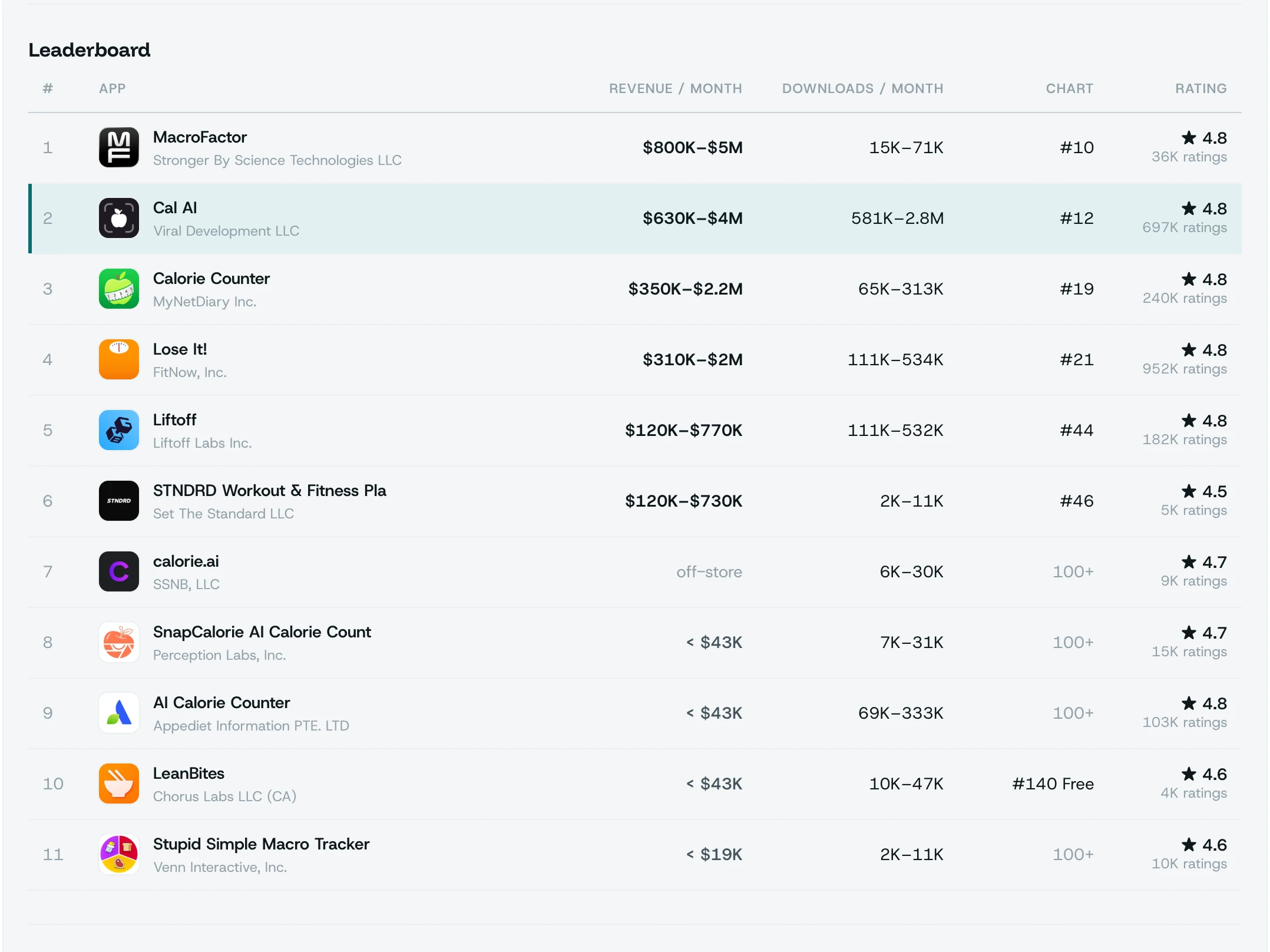
| Rivals | The apps the App Store itself lists next to it | Up to 10, each with the same figures |
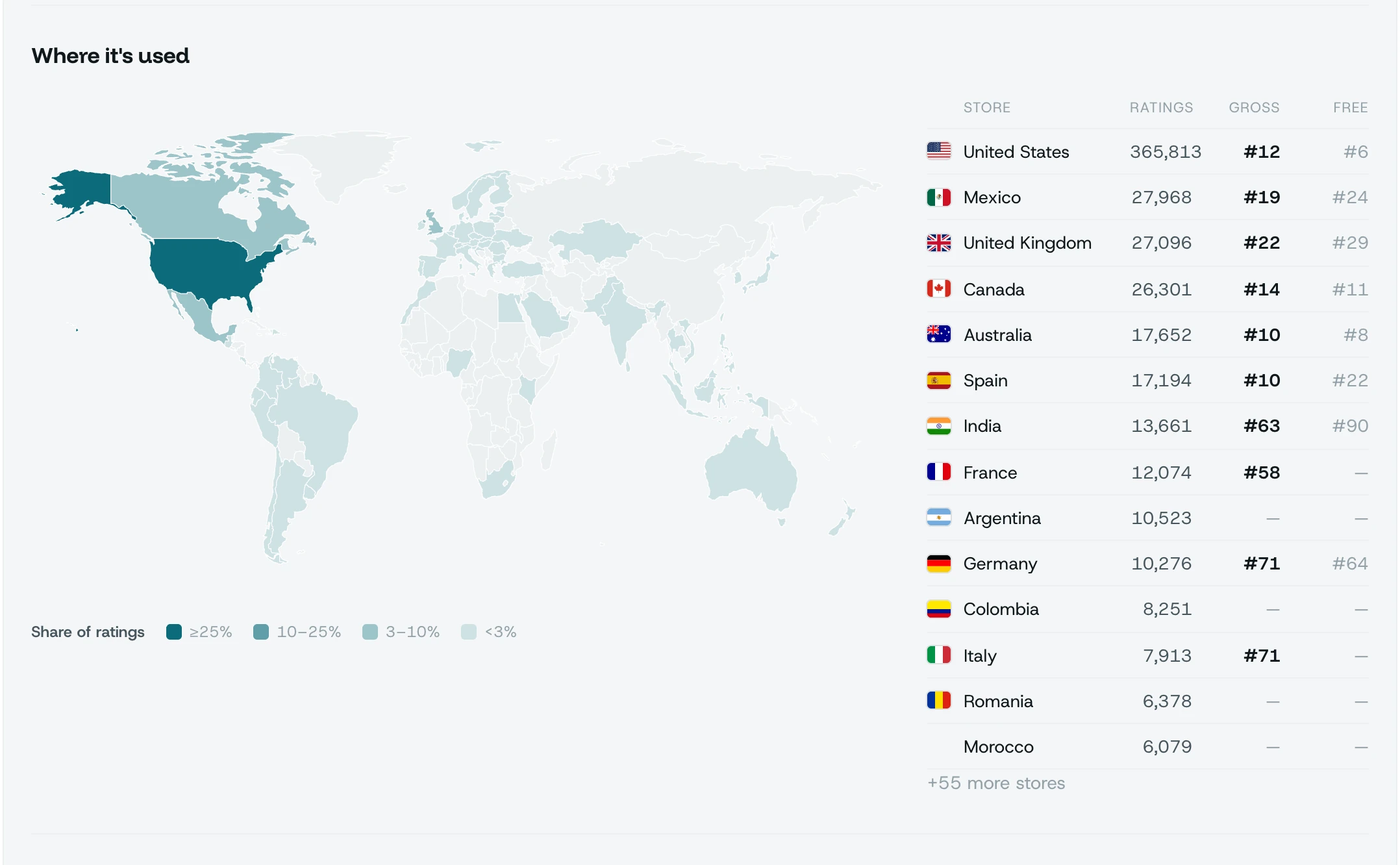
| Where it is used | Ratings count in each of 72 stores | A world map and a store list |
| Pricing and reviews | Its App Store product page and review feed | In-app price points, star split, recent reviews and their average |
| Publisher | Every app the same developer has on the App Store | App count, ratings and the revenue of those that chart |
| Ad networks | The developer site's app-ads.txt | Which networks sell its ad space, when it has one |
How the numbers are built
- Revenue, on the lists. Apple publishes the Top Grossing order, not the money — per country. We read the app's rank in 62 countries on iPhone and iPad lists, price each one with that country's curve for its genre and add them up; a second model corrects the total from the shape of those ranks. Both are fitted on 2,438 apps. On apps the fit never saw, the typical miss is ±32%, and 83% land within a factor of two. Every figure carries its confidence: at high confidence the typical miss is ±21%; the screen says which tier each figure is in.
- Revenue, outside the top 100. We use how many ratings the app has collected worldwide — the installed base, not how fast ratings arrive. 158 apps with verified revenue say what apps that size earn: the screen shows the range two thirds of them fall in and how many earn nothing at all. Off the Top Grossing 100 the app also earns less than #100 does, and when that ceiling is the tighter fact, it is what we write.
- Downloads. The same way from Top Free ranks in 62 countries. Off every list: ratings across 72 stores, spread over the app's life, times the usual downloads per rating.
- No in-app purchases, no store revenue. A free app that lists no purchases earns outside the App Store. The screen says exactly that instead of inventing a number.
The apps the store puts next to it
Not a category list: the rivals are the apps the App Store itself shows on this app's page, each with the same revenue, download and rank figures, ordered by revenue.
See how rivals are trackedWhat you do with it
Size up a niche before you build
Look at the top three apps for an idea and read what the market around them earns.
Find the searches behind itKnow the rival you keep hearing about
Revenue, downloads and where it charts, next to the apps the store lists beside it.
Track it on your keywordsFind the market it has not reached
The ratings map shows which stores carry it and which are still empty.
See which languages are emptyWhat this does not tell you
Apple publishes order and counts. Never money.
So some things stay off the screen on purpose:
- No revenue number without its accuracy. The confidence and typical miss sit right under it, or a ceiling with the share of apps that earn nothing.
- No revenue for apps with no in-app purchases. Their money is made off the store; we say so.
- No rank past 100 on Top Grossing. Apple lists no deeper, so the screen prints 100+ rather than guessing.
- Not the app's own analytics. For your own app, App Store Connect numbers beat any outside estimate — connect them in Install sources.
These are estimates from public signals, not the app's books. Apple publishes order and counts, never money or installs — so every figure comes with how close this kind of estimate has landed on apps whose real numbers are known.
What each plan includes
| Free | Pro | Studio | |
|---|---|---|---|
| Look up any App Store app | Yes | Yes | Yes |
| Rivals, map, pricing, reviews | Preview | Yes | Yes |
| Revenue and download estimates | — | Yes | Yes |
| Chart rank in 62 countries | — | Yes | Yes |
| Share card and public link | — | Yes | Yes |
Pro is $20/month ($16.67 billed yearly), Studio $60/month ($50 billed yearly).
Frequently asked
How accurate is the revenue figure?
On the lists, the figure comes from the app's rank in every country it charts in. Tested on apps the model never saw, the typical miss is ±32%; at high confidence ±21%, with 92% within a factor of two. Each figure is labelled with its confidence. Off every list we do not claim a number — we show what apps with as many ratings typically stay under.
Why does the number say ±?
Because Apple does not publish revenue or downloads. Any figure from an outside tool is an estimate too; we print how far ours typically lands from the real number instead of hiding it.
Does it work for Google Play apps?
Not yet. App Intelligence reads the App Store only.
Which country is the revenue for?
The whole world. The figure adds up the app's ranks in 62 countries, and the country list shows what share each one brings. An app that is #1 in Japan and absent from the US list is priced as what it is.
Can I share what I find?
Yes. Every lookup can be turned into an image card with a public link; the link opens a page with the same card.
Is there a free app revenue estimator?
The lookup itself is on the free plan: paste any App Store link and see a preview of its rivals, ratings map, pricing and reviews. Revenue and download estimates and chart rank in 62 countries are on Pro ($20/month) and Studio.
How can I estimate an app's revenue?
From public signals: its Top Grossing rank in every country it charts in, priced with that country's curve for its genre and added up. Apple publishes the order, never the money, so every figure here carries its measured accuracy. Paste the store link; revenue and download estimates are on Pro ($20/month) and Studio.
How do I see how many downloads an iOS app has?
Apple does not publish download counts for any app. The estimate here comes from the app's Top Free rank in 62 countries, or — off every list — from its ratings and age. For your own app, App Store Connect numbers beat any outside estimate: see install sources.
See this for your own app
Paste your store link, add your keywords. Rank, the apps above you and demand are measured every day.
Free plan: 1 app, 25 keywords in each of 2 storefronts, 30 days of history, no card, no end date. Pro is $20/mo.
Start free →