
Storelift › Features › Apple Ads
In the store
Apple Ads
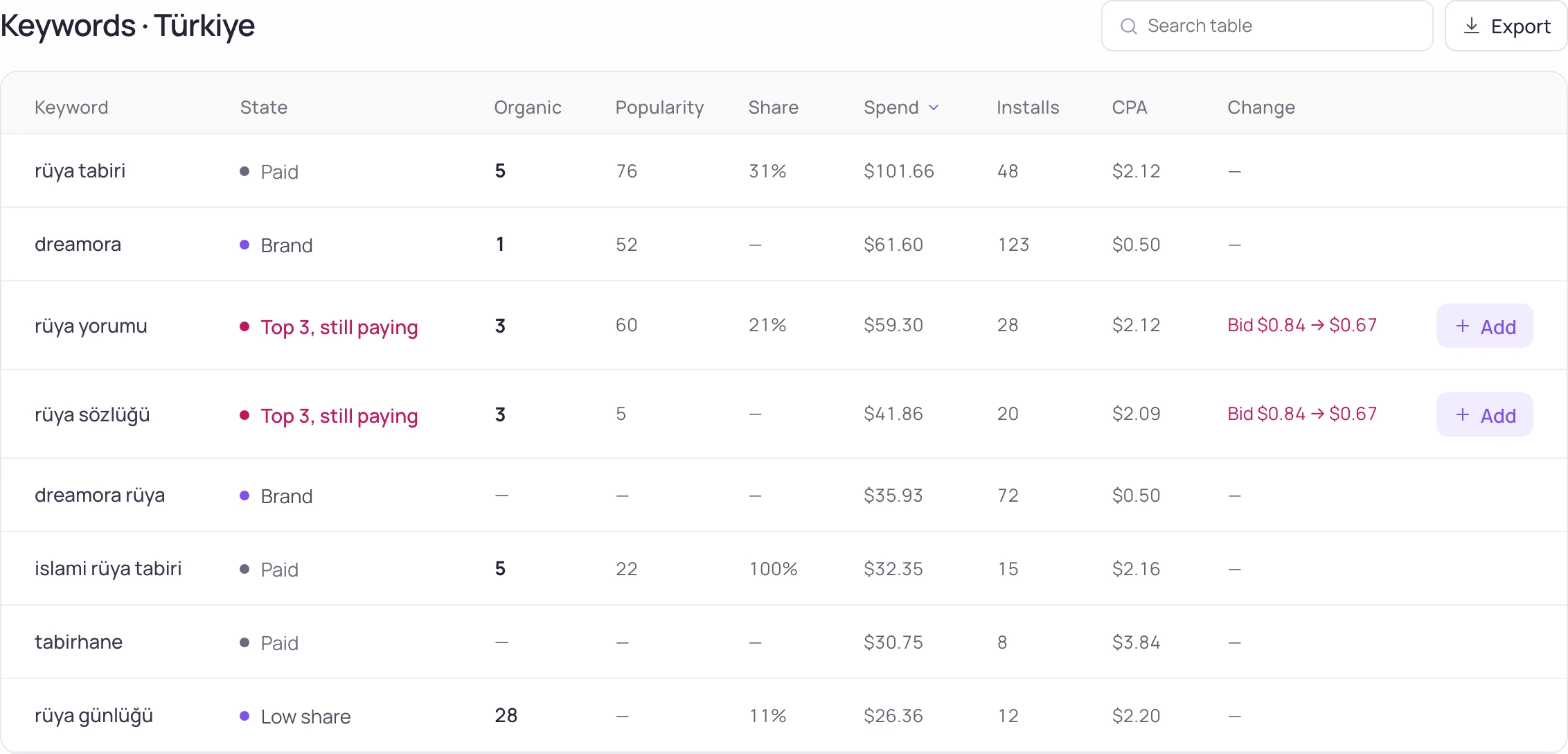
Connect your Apple Ads account and run it where you track ranks. Each keyword shows its organic rank beside its spend, and every edit waits in a change basket until you apply it.
Free plan: 1 app, 25 keywords in each of 2 storefronts, 30 days of history, no card, no end date. Pro is $20/mo.
What the screen shows
What you do with it
Stop paying for what you own
A keyword where you rank first organically and still buy every tap is the first saving to check.
See the Apple Ads workspaceHand the routine to rules
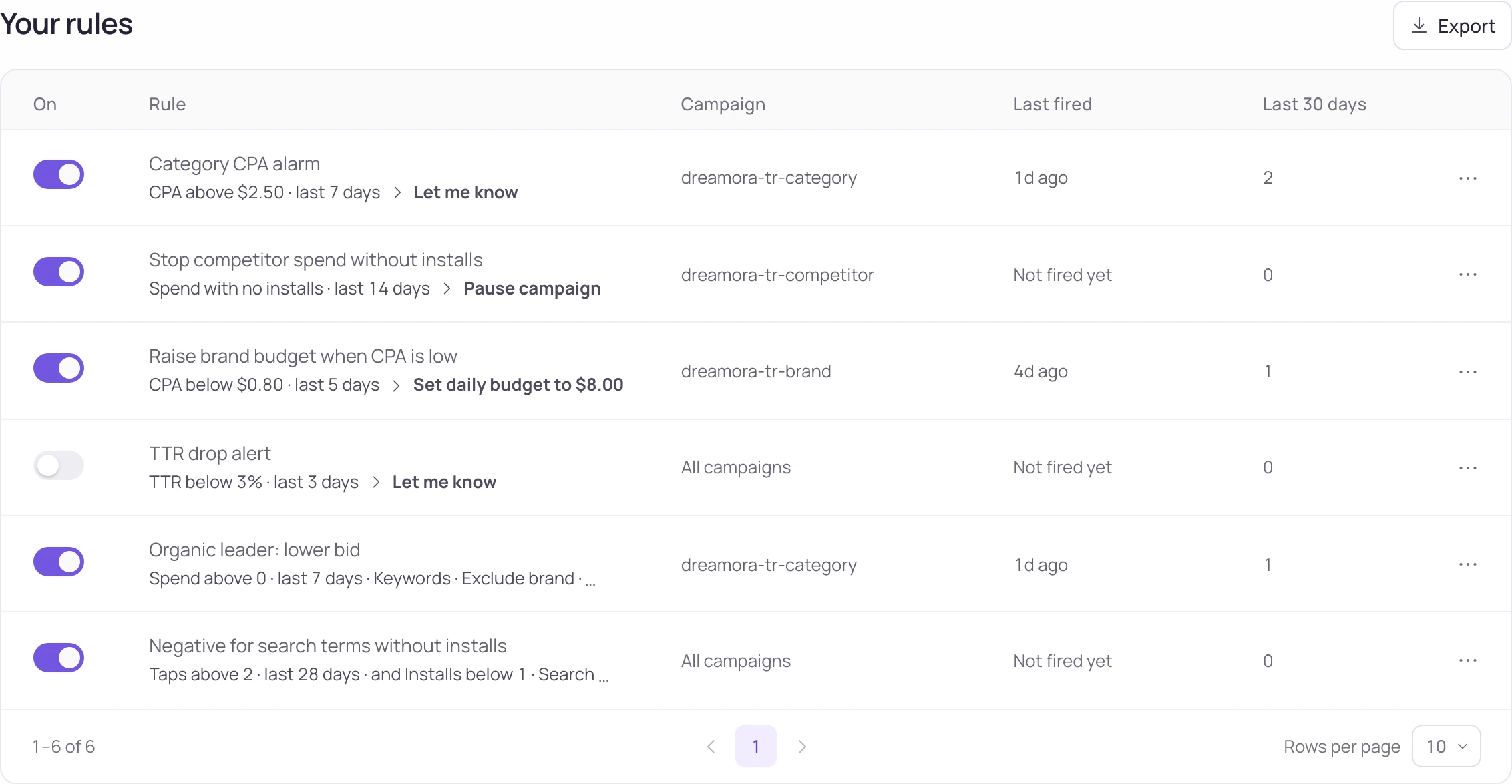
Write the rule once. It watches the campaign and adjusts bids or budgets within the limits you set.
Undo with one click
Every change carries its author and time. Roll back a single line or the whole package.
Six screens for one ads account
| Screen | What you see and do |
|---|---|
| Performance | Impressions, taps, installs, trials and revenue in one strip. A daily line marks the changes you made, next to budget pace, countries and the keywords whose cost moved. |
| Campaigns | Spend, installs, CPA (Tap), CPA (Total) and revenue for every campaign. Open one and work level by level: keywords, search terms, ad groups and negatives. New campaign sets one up step by step. |
| Opportunities | Suggestions grouped by type. Add one to the change basket, snooze it for 7 days or dismiss it. Your team works from the same list. |
| Keywords: organic + paid | Organic rank and popularity next to impression share, spend, installs and CPA (Tap), with a status label on every keyword. |
| Automations | Rules that watch a campaign and change bids or budgets, written as sentences. Start from a template and see what a rule would do right now before you turn it on. |
| Change history | Every change with who made it, the old value and the new one. Undo one line or a whole package. |
A rule you can read
“If CPA (Total) stays above your target for three days, lower the bid by 30%.” The rule reads the way you would say it, and the preview lists the keywords it would touch today.
What each plan includes
| Free | Pro | Studio | |
|---|---|---|---|
| Apple Ads connection and all six screens | Yes | Yes | Yes |
| Single changes, suggestions and undo | Yes | Yes | Yes |
| Automation rules | — | 5 | 25 |
| Bulk change packages | — | — | Yes |
Pro is $20/month or $200 a year ($16.67/month), Studio $60/month or $600 a year ($50/month). The Apple Ads screens are on every plan, Free included.
How it works
- Connect Apple Ads under Connections. Reports fill every screen; a key with write access turns on edits.
- Open Keywords: organic + paid and sort by organic rank to find keywords where you already rank high and still pay for taps.
- Edit bids, budgets, keywords or negatives where you see them. Each edit goes into the change basket.
- Preview the basket and apply it. The result is recorded in Change history, where it can be undone.
How changes reach your account
Nothing changes until you apply it.
Edits wait in the change basket. You see the full list first, and each result is recorded line by line.
- Members leave suggestions; owners and admins apply them. Read-only seats don't see the ads screens.
- Rules run with a cooldown and a daily action cap, so one rule cannot keep firing.
- Apple Ads runs on the App Store, so these screens open for iOS apps.
Updated:
Frequently asked
Can I manage Apple Ads campaigns from Storelift?
Yes. Connect a key with write access and edit bids, budgets, keywords, search terms and negatives from Campaigns. Edits go into the change basket and are applied after you preview them; Change history records each one and can undo it.
Do automation rules change bids?
Yes. A rule watches the metrics you name and can raise or lower a bid, change a budget, or pause and resume. It runs with a cooldown and a daily action cap. Rules come with Pro (5) and Studio (25).
Can my team work on the same ads account?
Members leave suggestions and admins apply them. Opportunities and Change history are shared, so everyone sees the same list and the same record.
Should I bid on keywords I already rank #1 for organically?
Keywords: organic + paid puts both numbers for that keyword on one row. Compare its spend and installs with your organic position and decide keyword by keyword.
Is it on the free plan?
The connection, the six screens, single changes and undo are on every plan, Free included. Rules start on Pro; bulk change packages are on Studio.
See this for your own app
Paste your store link, add your keywords. Rank, the apps above you and demand are measured every day.
Start free →Free plan: 1 app, 25 keywords in each of 2 storefronts, 30 days of history, no card, no end date. Pro is $20/mo.